
Step-by-Step Instructions (Text)
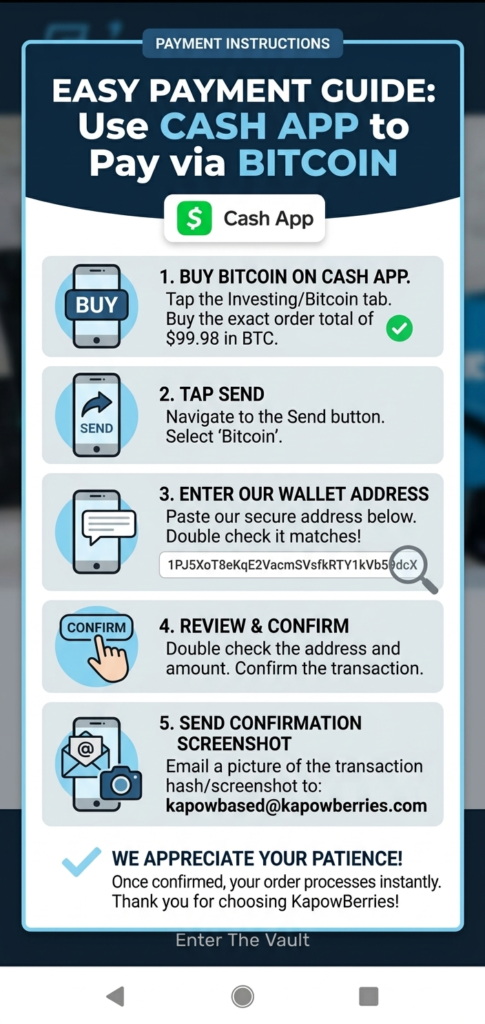
Paying with Cash App (easiest for mobile)
- Purchase BTC: Open Cash App, tap the Bitcoin tab, and buy the exact dollar amount of your order total.
- Send to Wallet: Tap the “Send” arrow, select Bitcoin, and paste our secure wallet address: 1PJ5XoT8eKqE2VacmSVsfkRTY1kVb59dcX
- Confirm: After sending, take a screenshot of the transaction confirmation.
- Verify: Email your screenshot and Order # to Kapowbased@kapowberries.com.
Section 3: Frequently Asked Questions (The “Trust” Section)
This addresses the “scam” concerns Nick mentioned.
Why only Bitcoin?
To ensure the highest level of privacy and security for our community, we have transitioned to a decentralized payment model. This allows us to cut out middleman fees and keep our prices competitive.
Is my order confirmed immediately?
Your order enters “Processing” the moment you send your confirmation screenshot. Once the transaction is verified on the blockchain (usually within 10-20 minutes), your order is cleared for shipping.
What if I don’t use Cash App?
You can use any major crypto exchange (Coinbase, Kraken, Binance) or a private wallet (Exodus, Trust Wallet) to send your payment to the address listed above.
Section 4: Contact Support
Still need help?
If you’re having trouble with the transfer, our team is available via the Live Chat on the bottom right of the screen or via email at kapowbased@kapowberries.com.